
By Cueup
DJ Software That Works Best with Your Controller – Find Your Match
By Cueup
DJing should be fun, but finding the perfect software to work with your controller can sometimes feel like solving a tricky puzzle. It’s easy to get frustrated when the features don’t match up with your gear or when laggy interfaces steal your creative flow. This post dives straight into the best DJ software options that seamlessly integrate with your controller. We’ve picked a few standout products that not only simplify the setup but also enhance your performance, letting you focus on the music and your unique style.
- 1
Serato DJ Pro
Pros
- +Easy to learn and highly customizable display interface
- +Great playlist management with intelligent playlist creation
- +High-quality FX engine that enhances mixes without overwhelming them
- +Smooth and responsive cue and loop functionalities
- +Quick installation process with excellent customer service
- +Robust performance and versatile control options for professional DJs
Cons
- -Sync mode and beat grid features have a steeper learning curve
- -Advanced settings may require practice to master fully
- 2
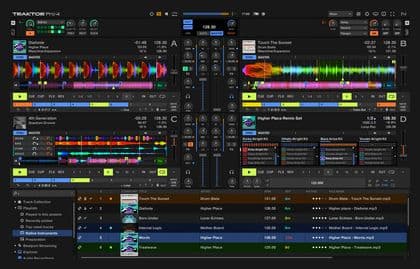
Native Instruments Traktor Pro 4
Pros
- +Robust and feature-rich DJ software from a reputable manufacturer
- +Extensive controller integration and customizable interface for versatile performance
- +Advanced features including on-the-fly stem separation and precise tempo analysis
- +Supports a wide range of audio formats for flexible usage
- +Positive feedback on its capability for deep beat manipulation and stems functionality
Cons
- -Controller Editor can be cumbersome and may require extra time to configure non-Native Instruments controllers
- -Some controller outputs, such as LEDs on certain devices, may not be recognized correctly
- -Lacks an export feature for a played track history with timestamps, which competitors offer
- 3
Serato DJ Suite
Pros
- +Comprehensive DJ software suite with multiple essential tools for DJs
- +Supports HD video mixing with Serato Video
- +DVS functionality for use with turntables or CDs
- +Includes Serato Play for practice without hardware
- +Variety of FX packs available for creative expression
- +Easy installation and activation process
- +High compatibility with various DJ hardware from Serato partners
Cons
- -Requires compatible Serato DJ Pro hardware, limiting some users
- -Internet connection needed for initial installation and activation, which might be inconvenient for some
- -Price point might be steep for casual or beginner DJs
- -Learning curve for beginners due to the extensive features
- 4
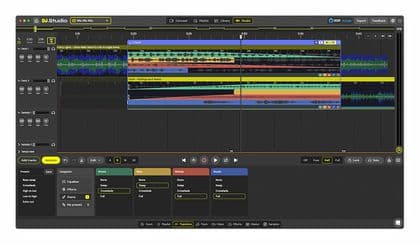
DJ.Studio Pro + Stems
Pros
- +Easy and quick setup with immediate download license delivery
- +Intuitive automix and manual transition controls
- +Excellent stem separation quality enabling creative remixing
- +Seamless integration with Traktor and other DJ libraries
- +Highly versatile effects including built-in effects and crossfade options
Cons
- -Free updates are only provided for one year from license activation
- 5
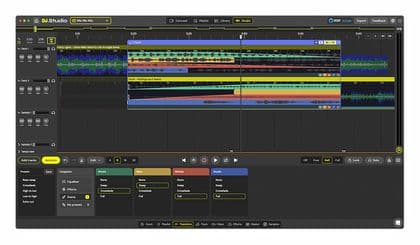
DJ.Studio Ultimate
Pros
- +Streamlined workflow for producing mixes without live mixing
- +Powerful automation tools including both automatic and manual control
- +Advanced stem separation allows for in-depth audio editing
- +Supports exporting projects directly into Ableton Live for further refinement
- +Wide compatibility with popular DJ libraries and file formats
- +Perpetual license provides long-term use without recurring fees
Cons
- -Requires a reliable internet connection for installation and activation
- -Demands relatively modern hardware and OS specifications
- -May not suit DJs looking for live mixing performance due to its automated approach
- 6
Serato DJ Expansions
Pros
- +Comprehensive expansion bundle that significantly extends Serato DJ Pro functionality
- +Offers a wide range of creative tools including video control, effects, and remix capabilities
- +Perpetual license ensures long-term use without recurring fees
- +Downloadable product available immediately after purchase
Cons
- -Requires ownership of Serato DJ Pro to be useful
- -Mandatory internet connection for installation and activation may limit offline users
- -Relatively high price point for users only interested in specific features
- 7
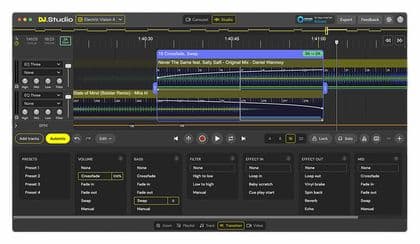
DJ.Studio DJ.Studio Pro
Pros
- +Enables creation of seamless DJ mixes without live performance
- +Automix assistant simplifies track sequencing and transitions
- +Exports projects compatible with Ableton Live for further editing
- +Supports a wide range of audio formats and DJ software libraries
- +Rich presets provide creative flexibility for transitions
Cons
- -Requires online activation, limiting simultaneous installations to 2
- -Minimum system requirements (Windows 10/Mac OS 11, 8 GB RAM, and sufficient storage) may restrict usage on older hardware
- -Needs an internet connection for installation and activation
- 8
Serato Software Club-Kit
Pros
- +Easy installation with immediate download license delivery
- +Straightforward, single-cable setup for club use
- +Excellent sound quality with no noticeable latency
- +Versatile control options and numerous deck views
- +Robust DVS system that offers many combination possibilities for live set management
Cons
- -Honestly, I don't see any cons for this product.
- 9
MixVibes Cross DJ 4 Pro
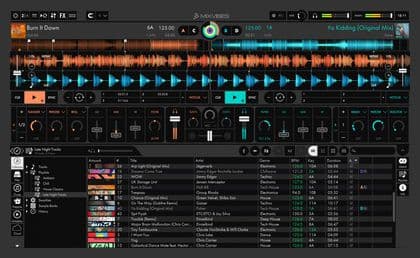
Pros
- +Clear and well-organized interface that allows quick access to key DJ functions
- +Good price-performance ratio, making it a competitive option in DJ software
- +Flexibility in hardware usage with support for multiple MIDI controllers and remote control options
- +Comprehensive feature set for audio and video mixing
Cons
- -Video display limitations: main monitor cannot be separated for external display, potentially exposing all working actions to the audience
- -Occasional instability with frequent crashes reported by some users
- -Sync function can behave unpredictably, requiring manual adjustments
- -May not suit users primarily needing robust video mixing capabilities
Frequently asked questions
What should I look for in DJ software for controllers?
Focus on compatibility with your gear, ease of use, intuitive interface, and robust features that boost performance without overwhelming you.
Are there free DJ software options available for controller users?
Yes, several free versions offer essential features, great for beginners. Often, these free offerings provide a solid starting point before upgrading to premium versions.
How do I match my controller with the right DJ software?
Check the software’s compatibility list, read user reviews, and look into trial versions to see how well it integrates with your controller’s features.
Which DJ software is most beginner-friendly?
Look for software with a clean interface and guided tutorials. Many options now cater to beginners with step-by-step instructions and easy-to-navigate controls.
Do premium DJ software options offer a significant upgrade?
Absolutely. Premium versions typically include advanced mixing capabilities, high-quality sound effects, and better overall performance that can take your sets to the next level.
Can I upgrade my DJ software if my needs change?
Yes, many platforms offer upgrade paths and add-on features that allow you to scale up as you get more comfortable with the basics and want to explore advanced techniques.
How do I troubleshoot common compatibility issues?
Start by checking device drivers and ensuring your firmware is up-to-date, followed by visiting manufacturer support pages or community forums for specific fixes.